
Command
The commands in CAD: Summary of from basic to advanced AutocCAD commands and the most detailed explaination. CAD commands from AutoCAD 2007 version to current 2021

Good skills to correct the faulty AutoCAD files
Good skills to correct the faulty AutoCAD files One of the nightmares for ACAD drawers...

Redraw command in AutoCAD – Recreate screen
Redraw command in AutoCAD – Recreate screen Redraw command in AutoCAD is the command to...

RAY command in AutoCAD – Draw extension line in CAD
RAY command in AutoCAD – Draw extension line in CAD RAY command in AutoCAD is...

Units command in AutoCAD – Adjust units in CAD
Units command in AutoCAD – Adjust units in CAD Units command in AutoCAD is used...

Rectang command in AutoCAD – draw rectangle
Rectang command in AutoCAD – draw rectangle Rectang command in AutoCAD, REC command in autocad...

Oops command in AutoCAD – Restore the deleted objects in CAD
Oops command in AutoCAD is the command to restore the deleted objects in CAD. To...

LTS command – Ltscale command in AutoCAD – Define the length of space and the dashed line
Ltscale command in AutoCAD (LTS command in CAD): to define rate for linetype, it means...

Len command – Lengthen command in AutoCAD – The command to shorten objects in CAD
Len command – Lengthen command in AutoCAD – The command to shorten objects in CAD...
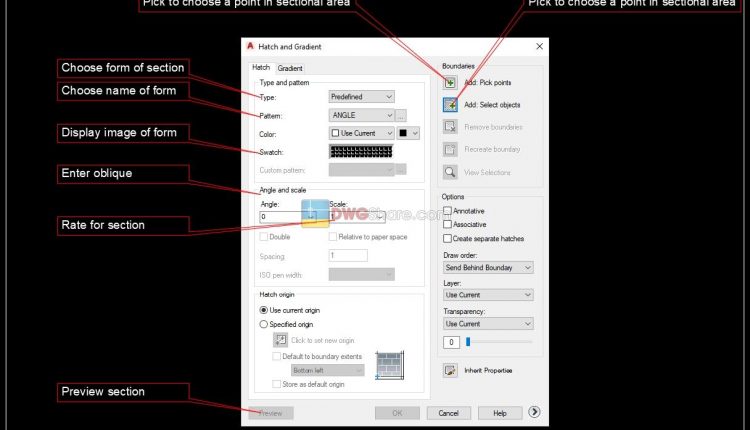
Hatch/Bhatch command in CAD
Hatch command in CAD (H command in CAD, Bhatch command in CAD): to hatch a...

Divide command in AutoCAD – Divide objects in CAD
The way to use Divide command in AutoCAD: Menu: Draw –> Point –> Divide Command:...

Instruction for using Xref in AutoCad
Instruction for using Xref in AutoCad Below, we would like to introduce about application of...

How to enter the coordinates in CAD and detailed examples
How to enter the coordinates in CAD and detailed examples The ways to enter coordinates...

The variables in AutoCAD
The variables in AutoCAD The variables in CAD (The system variables in AutoCAD): The system...

200 basic shortcut commands in AutoCAD
200 basic shortcut commands in AutoCAD Summary for basic command in AutoCad Hello everyone, Today...

How to create linetype in CAD (self-create linetype as electricity, water…)
How to create linetype in CAD: self-create file linetypes. Instruction for self-creating linetypes as electricity,...

Rounded command in CAD – detail instruction for use
Rounded command in cad (fillet command in autocad, rounded command for angle of rectangle in...

How to use appload command – Command to Load/ Unload applications in CAD
Appload command is to Load / Unload applications when starting in AutoCAD List of choices...

Boundary command in CAD
Boundary command in CAD is the command to create a Pline object (or Region) with...

Explode command in CAD
Explode command in CAD (xplode command in CAD, x command in CAD): to explode block...

INTERSECT command in CAD
INTERSECT command in CAD is the command to specify the intersection of Regions. The way...