
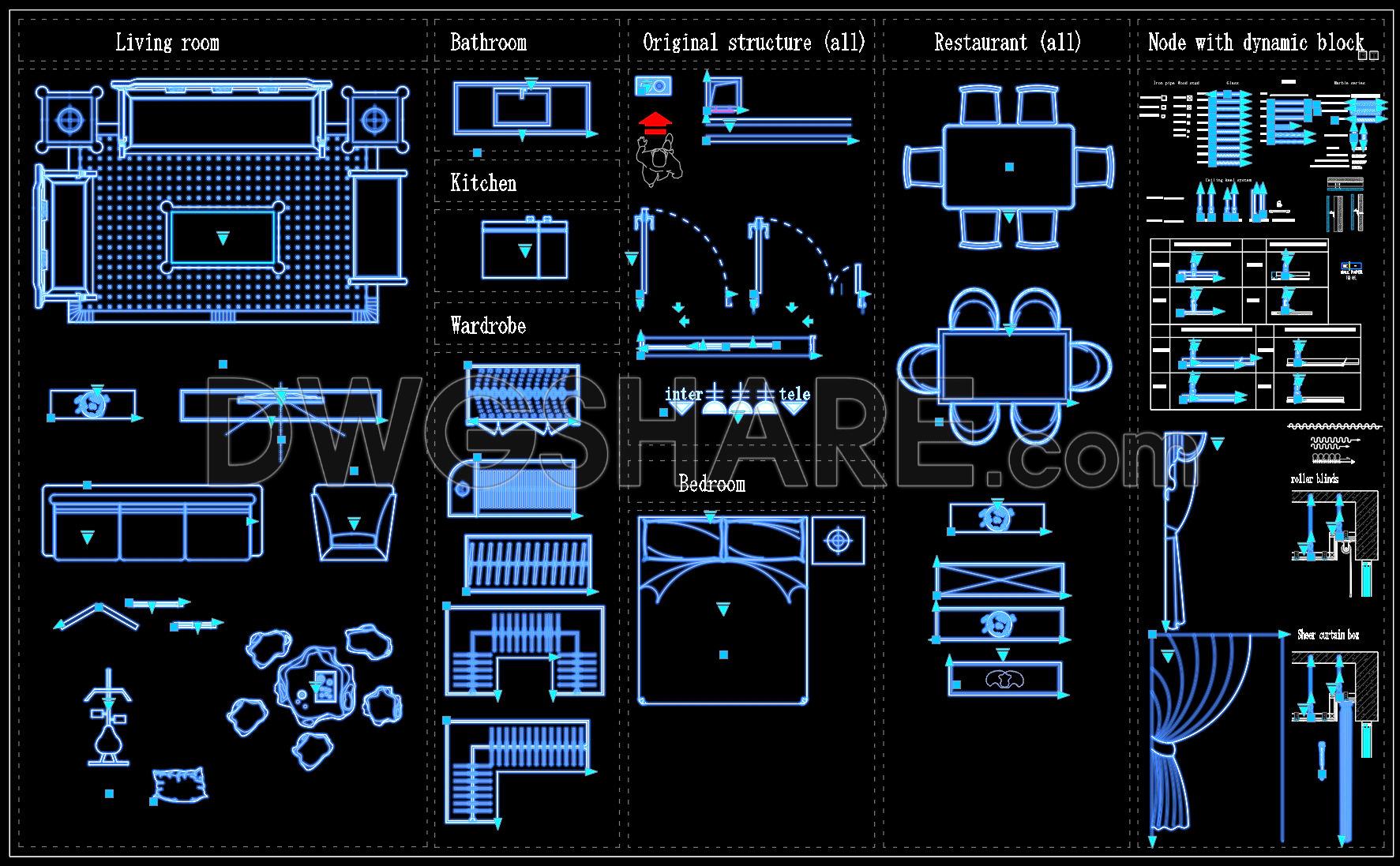
102. Dynamic AutoCAD Blocks for Interior Design – Living Room, Kitchen, Bedroom
At first glance, this file looks like a typical collection of interior CAD blocks. But after going through the video and actually interacting with it, you quickly realize this is a carefully built dynamic block library, not a random compilation.
1. Living Room
This is the most prominent section and clearly demonstrates the strength of dynamic blocks. The sofa isn’t just a static shape. Once selected, multiple grips appear—allowing you to stretch length, adjust depth, rotate, or flip direction.
What stands out is how well-controlled the geometry is. When stretched, the armrests and cushions maintain proper proportions instead of distorting. That tells you this was built with controlled stretch actions, not simple scaling.
Some blocks even allow configuration changes—switching from a straight sofa to an L-shaped layout with a single click. For layout work, this is extremely practical since living room arrangements often go through multiple iterations.
Additional elements like coffee tables, lounge chairs, and floor lamps also include dynamic controls. Small details, but they add flexibility and speed to the workflow.
2. Bathroom
This section is minimal but highly functional. Sink blocks include stretch parameters for width adjustment and sometimes visibility states for switching between single and double basins.
They’re not overly detailed, which is actually a benefit. Lightweight blocks keep drawings responsive and efficient—something only experienced users truly appreciate.
3. Kitchen
Here, dynamic logic becomes more evident. Cabinets stretch based on modular spacing, maintaining consistent divisions. This isn’t just scaling—it’s a combination of stretch and array logic.
Sinks and fixtures adjust proportionally within the system. Some blocks even show door swing arcs, useful for collision checks during layout planning.
4. Wardrobe
This is one of the most practical sections. Wardrobes can be stretched while automatically adjusting the number of panels. You can switch between hinged and sliding doors using visibility states.
It eliminates repetitive drafting and keeps everything consistent.
5. Bedroom
Beds include center-based scaling, meaning they stay aligned while resizing. You can toggle headboards or rotate orientation easily.
Supporting elements like nightstands and lamps are also dynamic, making layout adjustments smooth and quick.
6. Original Structure
This section contains basic parametric elements—lines, arrows, and adjustable components. Simple, but very useful for technical detailing.
7. Restaurant
A highlight of the library. Tables and chairs are grouped with array parameters, allowing you to increase or decrease seating instantly while maintaining spacing.
For F&B layouts, this saves a significant amount of time.
8. Dynamic Block Nodes
This is the “engine” behind everything. It shows how stretch, flip, rotate, array, and visibility parameters are combined.
Understanding this section helps you build your own optimized dynamic blocks.
Conclusion
This library isn’t about presentation—it’s about efficiency. Each block is designed to reduce repetitive work and adapt to real design scenarios.
I also recommend downloading other Dynamic CAD Block drawings for your project reference.
- File format: .DWG
- Size: 5.38 MB
- Source: DWGshare
- AutoCAD platform 2018 and later versions. For downloading files there is no need to go through the registration process
If you find our work useful, your support would mean a lot and help us grow even better.DONATE
Related posts
367. Free Download Luxury Interior CAD Blocks (Curtains, Fireplaces, Mirrors, Columns)
98. Free 3D Furniture CAD Blocks – Sofa, Cabinets & Interior Models DWG Download
380. Free CAD File of Wooden Sofa Set – Detailed Living Room Furniture Design
65. Free download of Beauty therapy equipment CAD blocks
38.Medical Furniture and Equipment Blocks
78. Free Download Dynamic CAD Blocks of Medical Radiology Equipment
360. Free CAD Drawing Modern Console Table Design
20.Classic Furniture CAD Blocks free download
250 Maps of Cities Around the World File DWG or DXF